By using this site, you agree to the Privacy Policy and Terms of Use.
Accept
Okay News
  • News
  • Entertainment
  • Business & Economy
  • Sport
  • Tech
Font ResizerAa
Okay NewsOkay News
Search
  • News
  • Entertainment
  • Business & Economy
  • Sport
  • Tech
Follow US
Tech

5 Useful Tips On How To Gain More Memory Storage Spaces On Android Phones

Promise Amadi
By
Promise Amadi
ByPromise Amadi
News Reporter
Amadi Promise is an Assistant Senior Editor at Okay Nigeria (Okay.ng) who handles Sports & Educational sections. He loves sharing what he knows and also learns...
Follow:
Published: 2017/05/30
2 Min Read
Share
SHARE
In this article, i show you simple Methods On how to put an end to this. Although there are other ways out there to do this but i prefer you try below. As it is well explained and detailed down.

Top 5 Tips On How To Get/Gain More Memory Storage Spaces On Your Android Phones/Device
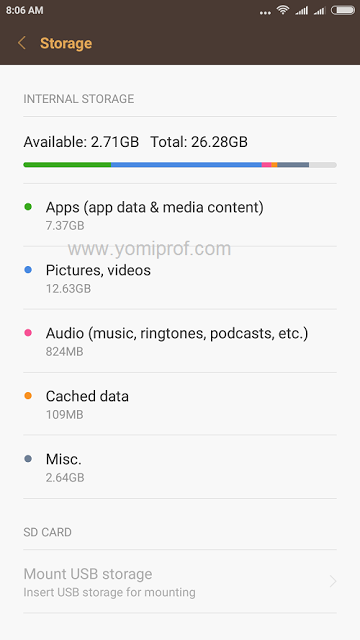
1. Back up photos and video to Google Photos, then delete them from your phone: Photos and video are one of the biggest space hogs on any Android phone, and more so as their integrated cameras come with increasingly high megapixel counts.
2. Clear Cache + Data: Cached files are little bits of data stored by apps every time you use them. You can do this manually for individual apps by going to Settings > Storage > Apps. Choose Any App You Wish to clear Cache For and Clear Cache. That’s All.
3. Use lite apps: Android developers nowadays make two variants of their apps, one standard, and the other lighter, which not only consumes less cellular data, but takes up less space on your phone, too. Some of those apps that consume space like Facebook, messenger, Youtube and opera have lite apps, consider switching to them.
4. Clear Old Downloads: Every time you download a PDF or other document from the web it is stored in your Downloads folder, but the chances are you probably don’t need it anymore. If you have a File Manager app use this to browse your Downloads folder and delete anything you don’t need.
5. Move apps and files to SD card: If your phone supports sd card, move all your apps and files to SD card; any or use apps2sd to move difficult apps to SDcard.
Share This Article
Facebook Pinterest Whatsapp Whatsapp Email Print
ByPromise Amadi
News Reporter
Follow:
Amadi Promise is an Assistant Senior Editor at Okay Nigeria (Okay.ng) who handles Sports & Educational sections. He loves sharing what he knows and also learns from others. Promise is also an Android developer at Rad5 Tech Hub.
Previous Article Covenant University Post-UTME Admission Form For 2017/2018 Is Out
Next Article Android TV Set To Be Having New UI Design With Android O Operating System

Stay Connected

FacebookLike
XFollow
InstagramFollow
TiktokFollow
WhatsAppFollow

You Might Also Like

Nigerian Communications Commission (NCC)
Tech

NCC Emerges Among Top Three Federal Agencies for Website Performance in 2025

By
Yusuf Abubakar
5 Min Read
Artificial intelligence (AI)International

Authors Sue Meta, OpenAI, xAI, Others Over Alleged Piracy of Books

By
Adamu Abubakar Isa
2 Min Read
TikTok
Tech

TikTok Shop Introduces Digital Gift Cards as It Pushes Deeper Into Online Shopping

By
Adamu Abubakar Isa
2 Min Read
Okay NewsOkay News
Follow US
2025 © Okay International Limited - All rights reserved
  • About Us
  • Advertising
  • Contact
  • Careers
  • Team
Welcome Back!

Sign in to your account

Username or Email Address
Password

Lost your password?

Continue with Facebook
Not a member? Sign Up



